Live Timing Overview
Our Live Timing offers a truly real-time experience for drivers. When a driver crosses the start beam, we visualize their run live on screen, updating to their actual precise time the moment they cross the finish.
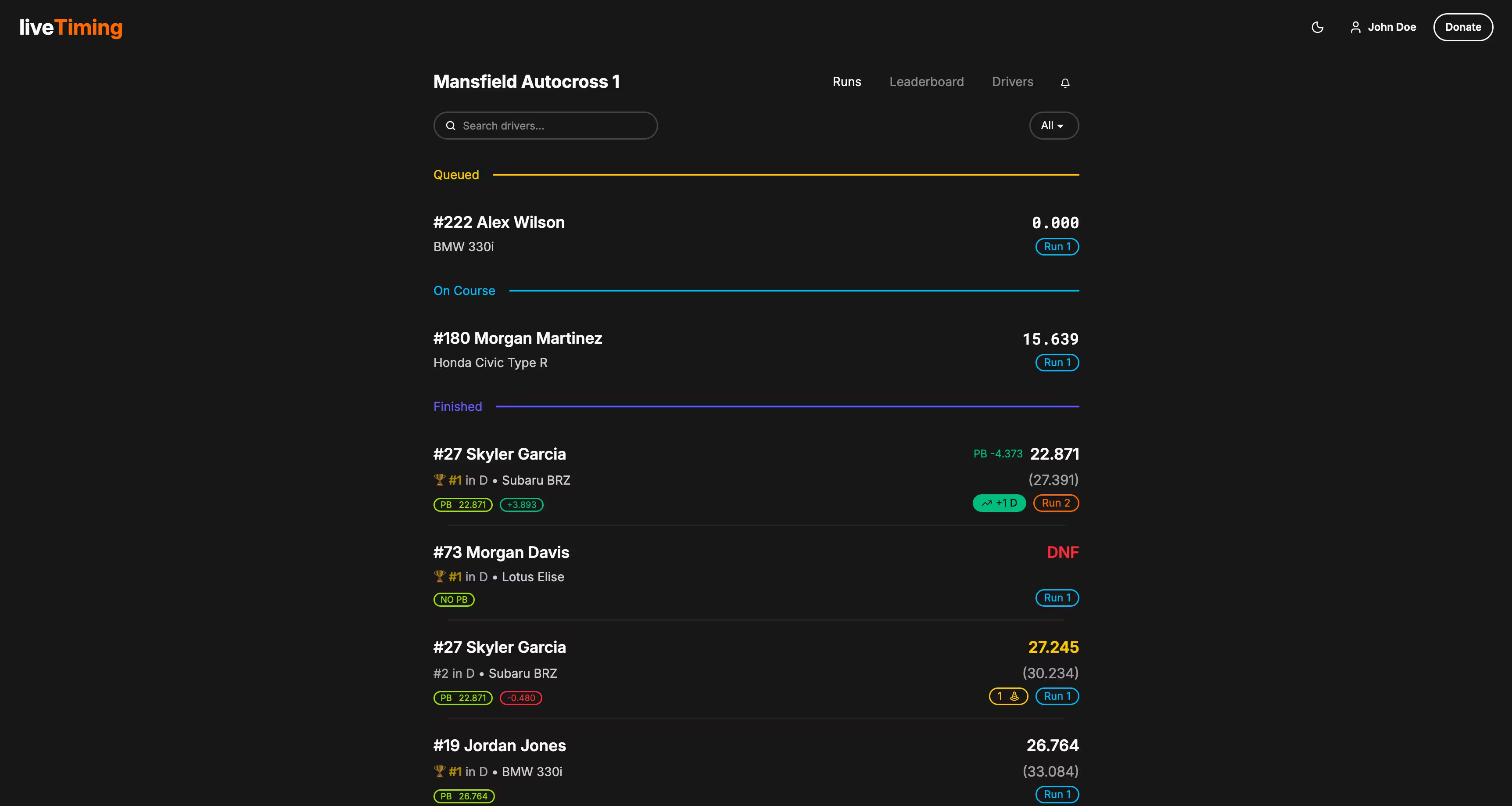
1. The Runs Feed
Similar to the timing crews view, the runs are divided into:
- In Queue: Who is coming up next.
- On Course: Drivers currently on track (watch for the live timer!).
- Finished: Completed runs with full data analysis.
2. Reading a Result Card
The result cards in the "Finished" section are data-rich. Here's how to read them:
Left Column (Driver Info & Gaps):
- Identity: Car Number and Driver Name.
- Position: Current rank in their Class or Group.
- Car Details: Year/Make/Model (if available).
- Personal best Badge: Your current personal best.
- Gap Badges:
- Difference Ahead: How far ahead you are of the person behind you (e.g.,
+2.483s). - Difference Behind: How far behind you are from the person ahead of you (e.g.,
-1.864s).
- Difference Ahead: How far ahead you are of the person behind you (e.g.,
Right Column (Times & Scoring):
- Main Time (PAX): Large text showing the calculated PAX time (if applicable).
- PB Indicator: If this run is a Personal Best, a value appears to the left (e.g.,
PB -1.294) showing how much time was dropped.
- PB Indicator: If this run is a Personal Best, a value appears to the left (e.g.,
- Secondary Time (Raw): Shown below in parentheses. This is the actual time on the clock before index.
- Position Move: An "Up Arrow" badge (e.g.,
+ 3 Class) indicates this specific run moved the driver up 3 spots in the standings. - Cones: A badge showing the number of cones hit (hidden if clean run).
- Run Count: A badge indicating which run this was for the driver (e.g., Run 1, Run 2).